


Introduction
- Energy Sistem® thanks you for buying your new Headphones BT9 Bluetooth; we hope you enjoy them.
- Wireless headphones with surround sound thanks to its Multi Driver technology with 8 speakers. NFC function to pair your Bluetooth® device with only one touch. You will also be able to play music via Micro SD/SDHC cards.
- We suggest you to read this user manual to get the most out of your product safely and to use all of its features.
- Find the full Headphones BT9 Bluetooth user guide here: http://www.energysistem.com/guide/39420.
Care and Maintenance
- Do not expose your Headphones BT9 Bluetooth to shock, dust, humidity or high temperatures.
- Do not use corrosive or abrasive cleaning products.
- Do not place your Headphones BT9 Bluetooth close to devices with strong magnetic fields.
- Keep your headphones clean and dust-free them with a soft, dry cloth.
- Do not disassemble the device. Any repair must be done exclusively by qualified personnel of Energy Sistem Soyntec S.A.
- Be sure to keep your Headphones BT9 Bluetooth turned off while they are not in use.
- Charge the lithium battery when run out of charge to lengthen its life.
Features
General Features
- Bluetooth V4.0 headphones.
- Wireless connectivity: Bluetooth® and NFC.
- Multi Driver technology with 8 speakers for an amazing surround sound.
- Play all your MP3 files directly from MicroSD/SDHC cards up to 32 GB.
- Easy to sync with tablets, smartphones, laptops, MAC, PC and other Bluetooth® devices.
- Control all its functions directly from the headphones.
- Syncing without codes.
- Connect to audio devices with a 3.5mm jack cable (included).
- Automatic answer function.
- Integrated noise-cancelling microphone.
- Up to 10m of range.
- Rechargeable lithium battery
- Up to 20 hours of use.
Technical features
- Bidirectional Bluetooth®
- V4.0
- NFC function: pair your Bluetooth® devices with a single touch.
- Compatible with MicroSD/SDHC cards up to 32 GB.
- Frequency: 2.4GHz ISM band.
- Frequency response: 5 Hz~25 KHz.
- Compatible with the following Bluetooth® versions: V 1.0. / V1.1. / V1.2 / V2.0 / V2.1 and newer versions.
- Bluetooth® protocols: HSP, HFP, A2DP, AVRCP.
- Sensitivity: 110 dB.
- Microphone Sensitivity: <=80 dB.
- Total Harmonic Distortion: <0.1%.
- S/N: 82 dB.
- Playback battery life: 16 hours.
- Call mode battery life: 20 hours.
- Stand by battery life: 325 hours.
- Battery Type: Polymer.
- Battery capacity: 650 mAh.
- Rechargeable via USB.
Content
- Headphones BT9 Bluetooth.
- Carrying Case
- 3.5 mm audio cable.
- USB Cable.
- Quick start guide
General overview
| 1. BLUETOOTH BUTTON 2. NFC 3. VOLUME + 4. LED INDICATOR 5. FORWARD 6. VOLUMEN - 7. BACKWARD 8. EQUALIZATION 9. MICRO SD BUTTON 10. PLAYBACK MODE 11. MICRO SD SLOT 12. LINE IN CONNECTION 13. MICROPHONE 14. MICRO USB CONNECTION |
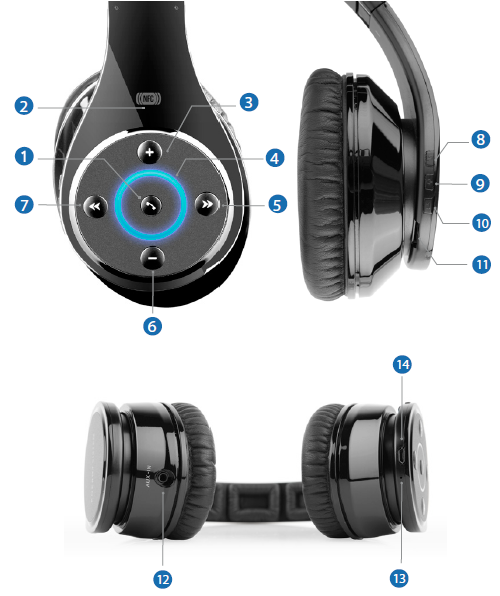 |
Main functions
Turn on / off your device
The Headphones BT9 have two independent ways to turned on: one for the bluetooth mode and one for the micro SD card player mode.
Use the Bluetooth button (1) to turn on and off the device in Bluetooth mode. Press this button once (1) and the device will turn on and will enter into pairing mode. To turn the device while it is in Bluetooth mode hold the same button (1) for some seconds.
To turn on /off the headphones in MicroSD / SDHC playback mode, keep the button (9) pressed. The headphones will start playing the songs stored in the MicroSD / SDHC card.
Charging the battery
When the headphones have a low battery and as long as you are in Bluetooth mode, they will start to emit an audible warning that will be repeated every few seconds until the battery is fully discharged. Also the LED (4) flashes red. To recharge the battery, connect the micro USB end of the USB cable (included) to your BT9 Bluetooth Headphones (13), and the other end into any USB device with USB port that can provide energy (PC, USB wall charger, car , etc.).
The LED (4) will light red when charging and it will light blue when the charging process has been completed.
Note: It is recommended to turn off the device when charging. Do not store or leave unused for a long period of time with the battery completely discharged.
Bluetooth pairing
With your Bluetooth Headphones BT9 turned off press the Bluetooth button (1) and you will see the LED (4) flash in red and blue. This will indicate that your Bluetooth Headphones BT9 are trying to sync with another Bluetooth device; start at the same time on your Bluetooth device, smartphone, tablet, laptop, etc. the sync function and once the BT9 Headphones Bluetooth are available, select connect on your device; they will connect immediately and without needing any codes. The LED will flash in blue to indicate that the device is switched on and in Bluetooth mode.
If your device has a NFC function, you can pair your devices by simply touching the NFC (2) icon, which located on the right earpiece. In this case it is not necessary that the headphones are turned on, but you must activate the NFC connection on your device.
If your Headphones BT9 Bluetooth are already synced with a device, they will pair automatically. To pair a new device, turn your BT9 Headphones Bluetooth on and hold the Bluetooth button (1). This way the headphones will start a new search.
NOTE: If you have the device turned on but the Headphones BT9 are not synced with any other device, bluetooth pairing mode will enter standby mode. To activate this mode again hold for 4 seconds the bluetooth button (1). You will hear a sound indicating that you have entered pairing mode and the LED (4) will flash faster.
Control talk
With the Headphones BT9 Bluetooth paired to your smartphone or tablet, you will be able to receive phone calls with its built-in microphone (14). To answer phone calls simply press the multifunction button (1) once. In case you are listening to a song when receiving a phone call, the music will stop automatically and you will hear a ring tone.
Press the multifunction button (1) again to end the phone call; the song you were listening to will resume from where it stopped when you received the phone call.
If you wish to reject the phone call from the headphones just press and hold the bluetooth button (1) for two seconds.
Recall
With your Headphones BT9 Bluetooth you will be able to repeat the last phone call registered on your smartphone. To do so, press the multifunction button (1) twice and it will automatically make the phone call.
Micro SD
To play MP3 files, insert a Micro SD card into the slot (11).
If you turn off the Headphones BT9 Bluetooth or remove the Micro SD card, the song you were listening to will be stored in the devices internal memory. When inserting the Micro SD card again, the headphones will resume the song you were listening to at the moment it stopped.
If you want to select the Bluetooth function directly from the Micro SD Playback Mode, simply press the Bluetooth button (1). However, it is not possible to do the switch from the bluetooth mode to the Micro SD Playback Mode, being necessary to turn off the bluetooth mode before.
Playback control
Once your BT9 Headphones Bluetooth are synced or if you have inserted a micro SD card, you will be able to control basic playback functions directly from the headset such as: volume up and down, forward and backward, play and pause in addition, you will be able to change within the 5 different equalization modes.
If you want to listen to another track press the forward button (5) once. You can also back song by pressing the backward button (7).
You can raise and lower the volume using the buttons (3) and (6). You will hear a "beep" sound when the max. volume is reached.
To pause or resume your music press the Bluetooth button (1) once.In case you are in Micro SD Playback Mode, press the micro SD button (9) to perfom these actions.
Line-In
In addition to the playback modes described so far, if you run out of battery or just do not want to use a wireless connection you have one more option to enjoy your Headphones BT9 Bluetooth: connect them to your player using the audio cable included.
To use this mode turn off your Headphones BT9 Bluetooth and connect the cable to the line-in port (12).
NOTE: In this mode, the playback control will not be available so to raise and lower the volume, change tracks or pause the music you will have to do it from the player connected to the headphones.
Warranty
Energy Sistem Soyntec SA is liable for any lack of conformity which exists at the time the goods were purchased during a period of 36 months. Batteries are excluded from the 36-month warranty, having a warranty period of 12 months.
This warranty covers any defects in workmanship or materials. This warranty does not cover any product failure due to accidents, misuse or alteration made by an unauthorized person.
The special 36-months warranty is valid for the European Union. For other countries, please refer to your specific legislation or your local distributor.
Warranty procedure
Visit the Support section at http://support.energysistem.com and select your product to view the FAQ (Frequently Asked Questions), user manuals, drivers and available updates, as the possibility to submit a query to the Technical Service or consult the warranty. You can check the availability of the user manual in your language at http://www.energysistem.com/en-en/support/manuals
Alternatively, you may prefer to contact the distributor from which you purchased the product, presenting the purchase receipt or invoice.
Specifications are subject to change without notice.
Trademarks All company, brand and product names are trademarks or registered trademarks of their respective companies.
© 2014 by Energy Sistem Soyntec S.A. All rights reserved.
Declaration of conformity
Manufacturer name: Energy Sistem Soyntec S.A.
Address: Pol. Ind. Finestrat C/. Calpe, 1 - 03509 Finestrat Alicante (Spain).
Tel: 902 388 388 // Fax: 902 119 034 // NIF: A53107488
We declare under our own exclusive responsibility that the product:
Headphones BT9 Bluetooth
Manufacturing country: China
China Is in compliance with the essential norms and standards of the Directive 1999/5/EC of the European Parliament and of the Council of March 09th 1999.
 |
This symbol on the product or the instructions means that your electrical and electronic equipment should be disposed, at the end of its life, separately from your household waste. For more information, please contact the local authority or dealer where you purchased the product. |