


Introduction
- Energy Sistem® thanks you for buying your new Music Box BZ1 Bluetooth, we wish you to enjoy it.
- Portable speaker with Bluetooth® technology and hands-free function. Enjoy the music stored on your smartphone, tablet or PC wirelessly. You will be able to take it everywhere and enjoy its stereo sound for long hours thanks to its powerful battery.
- We suggest you read this user manual to get the most out of your product safely, using all its features.
-
Find the whole Music Box BZ1 Bluetooth user manual on the following weblink http://www.energysistem.com/guide/39974
Care and maintenance
- Do not expose your Music Box BZ1 Bluetooth to shock, dust, humidity or high temperatures.
- Do not use abrasive or corrosive cleaning products.
- Keep your speaker clean and dust them with a soft dry cloth.
- Do not disassemble the device. Any repair must be done exlusively by qualified personnel of Energy Sistem Soyntec S.A.
- Be sure to keep your Music Box BZ1 Bluetooth turned off while not in use.
- Charge the lithium battery when ran out to extend its life.
Features
General features
- Transfer and enjoy your music through the wireless Bluetooth® technology.
- Easy pairing with tablets, smartphones, laptops, MAC, PC and any other Bluetooth® device.
- Compatible with iOS, ANDROID™, Windows, Blackberry, MAC OS, etc.
- Sound freedom: share and listen to your music wirelessly everywhere.
- Clear and clean sound across the audio spectrum.
- Portable and compact design that allows you to take it everywhere with you and amplify your music.
- Thanks to its anti-sliding rubber base, you can place it on any surface.
- Smart design with high quality rubber finish.
- Recall function. Answer your last call just by pressing a button on the speaker.
- Long-life lithium rechargeable battery.
- USB port charging system.
- 3.5mm "Audio-In" connection: listen to music from any portable player or PC.
Technical features
- Bluetooth® V3.0.
- Compatibility with A2DP y AVRCP profiles.
- Distance range up to 10m.
- 3.5mm Jack connection.
- Frequency response: 180Hz-20KHz
- S/N Ratio: >80 dB.
- Output power: 3W
- Driver diameter: 40mm
- Net weight: 212g
- Measures: 72x72x75mm
Battery specifications
- Rated voltage: 3.7V DC
- Charging time: 2~3 hours
- Battery capacity: 500mA
- USB charging system
-
Battery life up to 8 hours in Bluetooth mode
Product Content
- Music Box BZ1 Bluetooth Speaker
- Audio-In cable
- USB cable
- Quick guide
General Overview
| 1. MICROPHONE 2. CHARGING LED 3. VOLUME - 4. VOLUME + 5. LED INDICATOR 6. MENU BUTTON 7. AUDIO-IN CONNECTION 8. USB CONNECTION 9. ON/OFF BUTTON 10. PLAY/PAUSE and CONTROL TALK BUTTON |
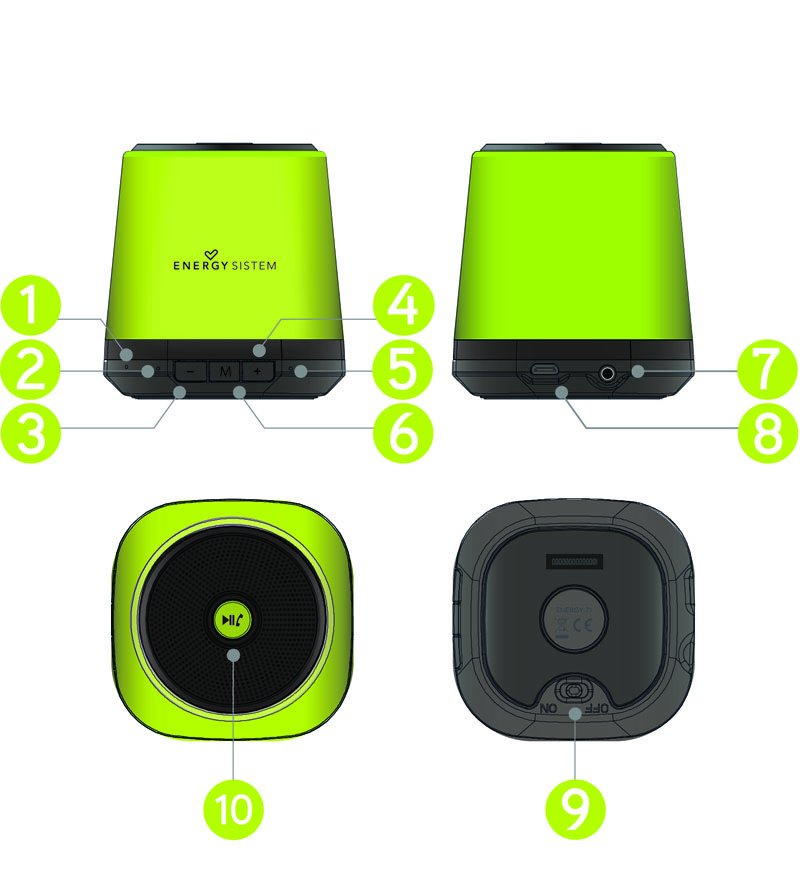 |
Main Functions
Turn ON/OFF your device
Use the button (9) to turn on / off your device.
To turn on your device, move the ON/OFF button (9) to the "ON" position and you will see that the LED (5) flashes in blue. The speaker will play a welcome sound meaning that the device is now turned on.
To turn off your device, move the ON/OFF button (9) to the "OFF" position.
While the device is turned on, the LED indicator (5) will keep flashig in blue or green depending on the play mode selected.
Changing play mode
When you turn on the device, pairing mode will start automatically. To change into "Audio-In" mode, you only need to connect the audio cable (included) to the Audio-In connection (7).
When Audio-In mode is selected, the led indicator (5) changes its color to green.
Charging the battery
When your device does not emit any sound or you start hearing some interference in short distance while bluetooth mode is selected, it is time to charge it. Connect the mini USB end of the included USB cable to your Music Box BZ1 Bluetooth (8) and the other end to any USB port that can provide energy (PC, USB wall charger, car, etc). The LED indicator (2) will turn red and when the charge is completed the LED will turn off.
Note: It is recommended to turn off the device when charging. Do not store or leave unused for a long period of time with the battery completely discharged.
Bluetooth Pairing
Everytime you turn on your Music Box BZ1 Bluetooth, pairing mode will start automatically; at the same time, the search and pairing process will start on your Bluetooth® device (smartphone, tablet, laptop, etc). Once you have identified the Music Box BZ1 Bluetooth on your device, select "Connect" and both devices will pair each other immediately with no need of pairing codes; the speaker will play a sound indicating that the connection has been established.
To pair the speaker with the last device again, you only need to turn on the Music Box BZ1 Bluetooth and the synchronization will start automatically.
To stop the current sync and sync other device, hold the button (6) for 2 seconds.
Play Control
Once you have paired your Music Box BZ1 Bluetooth, you can control the volume from the speaker. In order to do that; press buttons "-" (3) or "+" (4).
To pause or resume the playback, press PLAY/PAUSE button(10) once.
To backward or forward one song, hold "-" (3) or "+" (4) buttons.
Talk Control
Once you have paired your Music Box BZ1 Bluetooth with your mobile or smartphone, you can receive phone calls and use the built-in microphone to talk from the speaker. To answer an incoming call, press the button (10) and when you finish, press the button (10) again to end the call. If you are listening to music when you receive a call, the music will be paused and when you end the call, the music will resume.
Audio-In
It is also possible to enjoy your Music Box BZ1 Bluetooth without pairing it with any bluetooth device thanks to its Audio-In connection (7) in which you can connect an audio cable with a 3.5mm jack connector and the other end to your player.
Your Music Box BZ1 Bluetooth must be turned on in order to use this function.
NOTE: While using the device in Audio-In mode, it is not possible to control the playback neither the volume from the speaker. You have to do it from the player connected.
Warranty
Energy Sistem Soyntec SA is liable for any lack of conformity which exists at the time the goods were purchased during a period of 36 months. Batteries are excluded from the 36-month warranty, having a warranty
period of 12 months.
This warranty covers any defects in workmanship or materials. This warranty does not cover any failure of the product due to accidents, misuse or
alteration made by an unauthorized person.
The special 36-months warranty is valid for the European Union. For other countries, please refer to your specific legislation or your local distributor.
Warranty Procedure
- Visit the Support section at http://support.energysistem.com and select your product to view the FAQ (Frequently Asked Questions), user manuals, drivers and updates available, as the possibility to submit a query to the Technical Service or consult the warranty. You can check the availability of the user manual in your language at http://www.energysistem.com/en-en/support/manuals
- Alternatively, you may prefer to contact the distributor from which you purchased the product, presenting the purchase receipt or invoice.
Specifications are subject to change without notice.
Trademarks. All company, brand and product names are trademarks or registered trademarks of their respective companies.
© 2013 by Energy Sistem Soyntec S.A. All rights reserved.
Declaration of conformity
Issuers name: Energy Sistem Soyntec, S.A. - CIF: A53107488
Address: C/ Calpe, 1 - 03509 Finestrat - Alicante (Spain)
Tel: + 34 902 388 388 / + 34 966 813 257
We declare under our own exclusive responsibility that the product:
Description: Portable speaker
Brand: Energy Sistem
Model: Music Box BZ1
Manufacturer: Energy Sistem Soyntec, S.A.
Manufacturing Country: China
referred to in this declaration is in compliance with the essential norms and standards
EN 300 328 V1.9.1 (2015-02)
EN 301 489-1 V1.9.2 (2011-09)
EN 301 489-17 V2.2.1 (2012-09)
EN 62479:2010
EN 60950-1:2006+A11:2009+A1:2010+A12:2011+A2:2013
of the Directive 99/05/CE of the European Parliament and of the Council of March 09th 1999.
Finestrat, 1 July 2014.

Daniel Havillio
Product Management Director
