


Introduction
Energy Sistem® thanks you for buying your new Tower 8, we wish you to enjoy it.
Awaken your senses with this 2.1 sound tower. Connect your Bluetooth devices easily and enjoy its 100 W RMS. It also features FM Radio, a USB port and a SD/SDHC card reader.
We suggest you to read this user manual in order to get the most out of your product safely and with the best performance.
Care and maintenance
-
Do not expose your Tower 8 to impacts, dust or even high temperatures.
-
Do not use corrosive or abrasive cleaning products.
-
Keep the device clean and without dust.
-
Do not disassemble the device. Any repair should be done by the qualified staff of Energy Sistem Soyntec S.A.
-
Do not expose the Tower 8 to water or humid enviroments, which can damage both speakers and amplifier.
- Make sure that your Tower 8 is off while you are not using it.
Features
Main Features
- 2.1 sound tower system.
- Touch control.
- Wireless connectivity: Bluetooth® v4.0 + EDR.
- RMS power: 100 W (30W + 5W x 2 + 15 x 4).
- Bluetooth® range of use: 10 metres.
- Compatible with USB pendrives and SD / SDHC / MMC cards up to 64 GB.
- Compatible audio formats (USB / SD): WAV and MP3.
- FM Radio.
- Frequency range (FM): 87.5-108MHz
- 3.5 mm jack cable (included) for external audio devices.
- 2 x DC output for recharging external devices.
- USB port output current: 5V, 2.5 A.
- LED backlit display.
- Tablets and smartphone holder on top of the device.
- Wooden cabinet speakers.
- Remote control with full function control.
-
EQ pressets with manual setting option.
- Speakers: 4" x 4 (core) + 1.5" x 2 (twitters) + 6.5" x 1 (subwoofer).
- Frequency response: 20Hz-20KHz
-
Power supply: 120-240 V / 50-60 Hz.
Product Content
- Tower 8.
- Audio cable: 3.5 mm jack cable.
- Remote control.
- Quick guide.
Top view
 |
1. Play / Pause 2. Previous 3. Volume - 4. Folder 5. Mode 6. Repeat/Random 7. Holder for devices 8. Volume + 9. USB charging port 10. SD Card Slot 11. Audio-In 12. USB-in 13. Next 14. Main display |
Back view
On the back side you will find the Tower 8 main switch, as well as two control buttons for high/medium and low frequencies (indicated as Treble and Bass).
General functions
The Tower 8 is a music player with integrated Bluetooth® technology. You can enjoy your music via external USB/SD memories, listen to the radio and connect your MP3 player, smartphone and other audio devices using the Line-in inputs.
Press (5) to choose the desired function.
If there is no device connected to the USB and SD / MMC inputs, use the mode button (5) to switch between FM Radio, Bluetooth and Line-in (Aux) mode. When connecting a device, the Tower 8 will automatically switch to that mode.
When connecting multiple devices, press the mode button (5) to switch between them.
Power switch. Stand by mode.
Connect your Tower 8 to the power supply and put the switch located on the back to the "ON" position. Now you can turn on and off the device by keeping the "PLAY" button pressed for two seconds (stand-by mode).
We recommend you to turn off the device when not using it over longer periods of time.
Display
The Tower 8 is equipped with a backlit display which is located on top-front of the device.
When turned on, the screen will displays the current play mode. Other information will be displayed in the screen of the device.
Touch control
The Tower 8 features a touch panel on the upper part to control all functions.
Press the touch panel with your fingertips for a better response.
Bluetooth function
" - bt- " will appear in blue letters on the display when pressing the mode button (5) (the Tower 8 starts in Bluetooth mode by default).
Now you can pair it with your Bluetooth devices (tablet, smartphone, PC, MAC, etc).
The Tower 8 will appear on your Bluetooth devices as "Tower 8". Simply select it and both devices will pair automatically.
After the pairing is done, you can start playing your favorite songs wirelessly. If you want to pair the Tower 8 with another device, turn off the Bluetooth function on your audio device or keep the mode button (5) pressed for four seconds. Now you can search and pair it with a different Bluetooth audio device. You can also turn off and re-enter Bluetooth mode by briefly pressing the mode button (5).
The Tower 8 features A2DP (Advanced Audio Distribution Profile) that allows you to listen to stereo music, and AVRCP (Audio Video Remote Control Profile) to control the music playback directly on the panel or using the remote control.
MP3 function with external memories
To play MP3 files, insert an external memory such as a USB stick or a SD/MMC memory card into the corresponding slot, (12) and (10) respectively. "USB" or "SD" will appear on the display, deppending on the type of memory you are using.
If you switch off the Tower 8 or remove the external memory, the music playback will continue where it stopped.
To skip a track, use next (13) and previous (2) buttons. To move forward and backward in the same song, press and hold for 4 seconds the forward (13) and back buttons (2).
You can change the folder by pressing the button (4).
Playback order
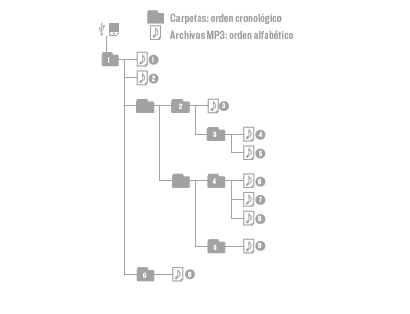
The folders included in the memories are read in chronological order and all songs contained in these folders are read in alphabetical order.
For example: after creating two folders called A and B, we copy first the B folder and then the A folder. This way the first played song will be the first one from the B folder.
Here you have a diagram of the reading order:
FM Radio
In order to use the radio function, you will have to scan for available radio stations, which then will be stored in the device's memory. It is not necessary to repeat this procedure unless you change location or modify the radio stations.
Press and hold the MODE button (5) during 4 seconds when being in radio mode. This will save all stored radio stations in the device's internal memory. This process may take a few minutes.
Pressing the forward (13) or backward (2) buttons will allow you to change between different stations.
Audio-In
To use the Line-in function, connect the audio cable to the Audio-In port (10) - AUX will appear on the display - and connect the other side to your audio device.
When connection the cable to the input audio (11), the "Audio-In" function will activate automatically.
In "Audio-In" mode, the music as well as any modification made will be heard on the Tower 8.
Equalizer sound.
The Tower 8 has two controllers on its back side to adjust the EQ sound:
- Treble EQ.
- Bass EQ.
In "SD" and "USB" mode you can also select 1 of the 5 available EQ presset by pressing and holding the folder button (4) for 4 seconds or by pressing the EQ button on the remote control:
- EQ 0: Normal.
- EQ 1: Pop.
- EQ 2: Rock.
- EQ 3: Jazz.
- EQ 4: Classic.
- EQ 5: Vocal.
Device Recharging
The Tower 8 features one "DC OUT" (9) output that allow you to recharge your smartphone, tablet or MP3 player while using it.
Output specifications "DC OUT":
Voltage = 5V
Maximum Current = 2.5 A
Any device that requires a voltage above 5V can not be charged.
Note: To prevent interference to the radio while charging devices; keep the FM antenna separate charging cable.
Remote control
Control all the possibilities the Tower 8 has to offer:
-
ON/OFF.
-
Select mode (SOURCE button).
-
Mute function for all modes.
-
Volume control, Play/Pause, Forward and Backward songs/ FM channels.
-
EQ pressets for USB/SD mode (EQ button).
-
Manage USB and SD memory folders (Browse button).
-
Repeat and Shuffle (RPT button).
- Numeric buttons to select music tracks (for USB, SD and FM radio modes).
Warranty
Energy Sistem Soyntec SA is liable for any lack of conformity which exists at the time the goods were purchased during a period of 36 months. Batteries are excluded from the 36-month warranty, having a warranty period of 12 months.
This warranty covers any defects in workmanship or materials. This warranty does not cover any failure of the product due to accidents, misuse or alteration made by an unauthorized person.
The special 36-months warranty is valid for the European Union. For other countries, please refer to your specific legislation or your local distributor.
Warranty procedure
-
Visit the Support section at http://support.energysistem.com and select your product to view the FAQ (Frequently Asked Questions), user manuals, drivers and available updates, as the possibility to submit a query to the Technical Service or consult the warranty.
You can check the availability of the user manual in your language at http://www.energysistem.com/en-en/support/manuals - Alternatively, you may prefer to contact the distributor from which you purchased the product, presenting the purchase receipt or invoice.
Specifications are subject to change without notice.
Trademarks. All company, brand and product names are trademarks or registered trademarks of their respective companies.
© 2015 by Energy Sistem Soyntec S.A. All rights reserved.
Declaration of Conformity
Manufacturer Name: Energy Sistem Soyntec S.A.
Address: Pol. Ind. Finestrat C/. Calpe, 1 - 03509 Finestrat Alicante (Spain).
Tel: 902 388 388 // Fax: 902 119 034 // NIF: A53107488
We declare under our own exclusive responsibility that the product:
Tower 8 Bluetooth
Manufacturing Country: China
Is in compliance with the essential norms and standards of the Directive 1999/5/EC of the European Parliament and of the Council of March 09th 1999.
 |
This symbol on the product or the instructions means that your electrical and electronic equipment should be disposed, at the end of its life, separately from your household waste. For more information, please contact the local authority or dealer where you purchased the product. |