


Introduction
- Thank you for your trust in our company and for buying the new Headphones 1 Bluetooth. We hope you enjoy them.
- These Bluetooth headphones combine an outstanding sound experience with a modern design in fresh and youthful colours. You can answer your phone calls and control your music playback directly from your headphones.
- We recommend you to read this manual in order to enjoy your device safely and with maximum performance.
Care and maintenance
- Do not expose your Headphones 1 Bluetooth to impacts, dust, humidity or high temperatures.
- Do not use neither corrosive nor abrasive cleaning products.
- Keep the headphones clean and free of dust using a soft dry cloth.
- Do not disassemble your headphones. All repair works should be carried out exclusively by qualified staff of Energy Sistem Technology, S.A.
- Do not leave the battery completely discharged for a long period of time.
Features
General features
- Headphones with Bluetooth technology.
- Easy synchronization without codes.
- Compatible with iOS, ANDROID and PC devices.
- Hands-free and call control functions.
- Control playback and volume directly from the headphones.
- Rechargeable lithium battery.
- USB charging system.
Technical features
- Bluetooth version: Bluetooth 4.2, class II.
- Supported profiles: A2DP1.2 AVRCP1.4 HSP1.2 HFP1.6.
- Distance range: 10 m.
- Operating frequency: 2.4 GHz.
- Maximum output power: 2.01 dBm.
- Frequency response: 40 Hz ? 20 KHz.
- THD < 1%.
- SPL : 109 ± 3 dB.
- Dynamic transducer.
- Diaphragm diameter: 40 mm.
- Microphone sensitivity: -38 dB ± 3 dB.
- Size: 180 x 170 x 54 mm.
- Weight: 137 g.
Battery specifications
- 300 mAh lithium battery.
- Battery life in playback mode: 8 h.
- Battery life in hands-free mode: 8 h.
- Charging time: 1.5 h.
- USB - microUSB charging system.
Product content
- Headphones 1 Bluetooth.
- USB charging cable.
- Audio cable.
General overview
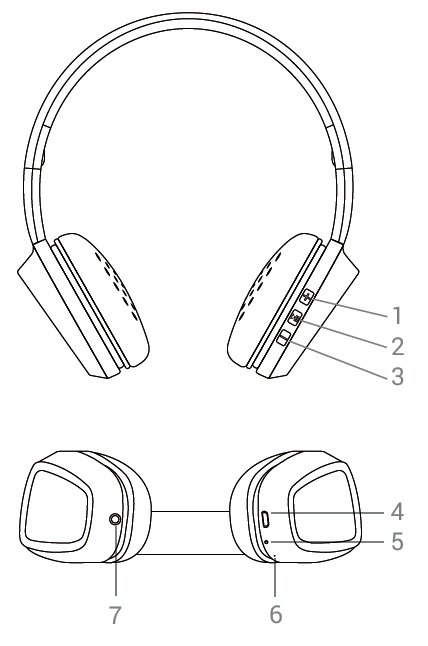
- VOLUME + / NEXT
- MULTIFUNCTION BUTTON
- VOLUME - / BACK
- PORT TO CHARGE THE BATTERY
- STATUS INDICATOR
- MICROPHONE
- AUDIO-IN
Main functions
Switching on and off the device
To turn on your device, press and hold the MULTIFUNCTION BUTTON (2) for 2 seconds and the INDICATOR (5) will start flashing blue. You will hear a confirmation sound, which means that the device is on.
To turn off your device, press and hold the MULTIFUNCTION button (2) again for 4 seconds. You will hear a sound to confirm that the device is off. The INDICATOR (5) will stop flashing.
When the device is on, the INDICATOR (5) will keep flashing blue.
Charging the battery
You will hear a warning sound when your headphones are about to run out of battery. This sound will be heard every few minutes until the battery is completely discharged. Connect the micro USB end of the included USB cable to the PORT TO CHARGE THE BATTERY (4) and the other USB end to any device with an USB port that can provide energy (PC, USB wall charger, car charger, etc) to charge the battery. The INDICATOR (5) will glow red. Once the battery is fully charged, the indicator will turn off.
Important considerations:
- We recommend turning off the device when charging.
- Do not store or leave your device unused for a long period of time with an empty battery.
Bluetooth pairing
Once your Headphones 1 Bluetooth are off, press and hold the MULTIFUNCTION button (2) for 4 seconds and the INDICATOR (5) will start flashing blue and red. At this point, your Headphones 1 Bluetooth will be trying to pair with another Bluetooth device. Start then the search and pairing process from your Bluetooth device (smartphone, tablet, laptop, etc). Once your Headphones 1 Bluetooth appear on your device screen, select "connect". The devices will be connected immediately without codes and the INDICATOR (5) will start flashing only in blue, which means that the device is on and has been correctly paired.
Your Headphones 1 Bluetooth will automatically turn off after 10 minutes if they are in Bluetooth mode and not synchronized with any device.
Playback control
Once your Headphones 1 Bluetooth are paired, you can control basic playback functions such as turning up and down the volume, switching to the next or previous song and pausing and resuming playback directly from your headphones.
Press and hold the NEXT button (1) to switch to the next song. You can also press and hold the BACK button (3) to switch to the previous song.
Press the VOLUME + (1) and VOLUME - (3) buttons to turn up and down the volume respectively. You will hear a beep when reaching the maximum volume level.
Press the MULTIFUNCTION button (2) once to pause or resume playback. Your Headphones 1 Bluetooth will automatically turn off if you pause playback for more than 10 minutes in order to save battery.
Audio input
In addition to all modes explained so far, you can also connect your Headphones 1 Bluetooth to your music player through the included audio cable if you run out of battery or simply do not want to use the wireless connection.
Turn off your Headphones 1 Bluetooth and connect your cable to the AUDIO-IN (7) to use this mode.
NOTE: Playback control function is not supported in this mode. Therefore, you will have to use the player connected to your headphones to turn up and down the volume, switch to another song or pause playback.
Call control
Once your Headphones 1 Bluetooth and smartphone are synchronized, you will be able to receive calls and use the MICROPHONE (6) to talk while you wear them.
Use the MULTIFUNCTION button (2) to answer an incoming call. If you are listening to music when you receive a call, playback will pause and you will hear an incoming call sound. You can also press and hold this button for 2 seconds to reject an incoming call.
Press the MULTIFUNCTION button (2) again to end a call. Playback will resume from the point it has been interrupted.
You can also press twice the MULTIFUNCTION button (2) while you are listening to music to dial the last telephone number in your smartphone's call log.
Warranty
Energy Sistem Technology, S.A. is liable for any lack of conformity that exists at the time the goods are purchased during a period of 36 months. Batteries are excluded from the 36 month warranty, having a warranty period of 12 months.
This warranty covers any defects in workmanship or materials. This warranty does not cover any product failure due to accidents, misuse or alteration made by an unauthorized person.
The special 36-month warranty is valid for the European Union. For other countries please refer to the specific legislation or your local distributor.
Warranty procedure
Please visit http://www.energysistem.com/en/support and select your product to view the FAQ (Frequently Asked Questions), user manual, quick guide, drivers and updates available, submit a query to Technical Support Service or manage the warranty.
You can check the availability of the user manual in your language at http://www.energysistem.com/en-en/support/manuals
Alternatively, you may prefer to contact the distributor that sold the product by presenting the purchase receipt or invoice.
Important: This warranty does not cover any damage or loss of data stored in warranty products. Therefore, Technical Service of Energy Sistem Technology, S.A. will not assume any loss of the above mentioned information. In this respect it is recommended that you make a backup of your data and remove any personal data from the product's internal memory before you send it or send the device with the original data only.
Specifications are subject to change without notice.
Trademarks All company, brand and product names are trademarks or registered trademarks of their respective companies.
©2017 by Energy Sistem®. All rights reserved.
Declaration of conformity
Issuer?s name: Energy Sistem Technology, S.A. - CIF: A53107488
Address: C/ Calpe, 1 - 03509 Finestrat - Alicante (Spain)
Tel: + 34 902 388 388 / + 34 966 813 257
We declare under our own exclusive responsibility that the product
Description: Wireless headphones
Brand: Energy Sistem
Model: Headphones 1 Bluetooth
Manufacturer: Energy Sistem Technology, S.A.
Manufacturing Country: China
referred to in this declaration is in compliance with the essential norms and standards
EN 300 328 V2.1.1
EN 301 489-17 V3.1.1
EN 301 489-1 V2.2.1
EN 62479:2010
EN 60065:2014
EN 50332-1:2013
EN 50332-2:2013
in conformity with the essential norms and standards of the Directive 2014/53/EU of the European Parliament and of the Council of March 16th April 2014.
Finestrat, 01st February 2017.

Marco Antonio Velázquez Fierro
Product Management Director
