


Introduction
- Thank you for your trust in our company and for buying the new Headphones 7 Bluetooth ANC. We hope you enjoy them.
- We recommend you to read this manual in order to enjoy your device safely and with maximum performance.
Care and maintenance
- Do not expose your Headphones 7 Bluetooth ANC to impacts, dust, humidity or high temperatures.
- Do not use neither corrosive nor abrasive cleaning products.
- Keep the headphones clean and free of dust using a soft dry cloth.
- Do not disassemble your headphones. All repair works should be carried out exclusively by qualified staff of Energy Sistem Technology, S.A.
-
Do not leave the battery completely discharged for a long period of time.
Features
- Headphones with Active Noise Cancelling technology to reduce background noise and let you enjoy every music detail.
- Bluetooth 4.0 to play music wirelessly.
- Self-adjusting headband and slim design with ear pads that fit your ears perfectly.
- Control playback: turn the volume up or down, switch to the next or previous track and answer incoming calls with the built-in microphone.
- Versatility to carry them around: folding system and carrying case to store them anywhere.
- Lithium polymer battery.
- Connect them to any device using the removable audio cable.
Technical features
- Bluetooth version: Bluetooth 4.0, class II
- Supports following profiles: A2DP1.2 AVRCP1.4 HSP1.2 HFP1.6.
- Distance range: 10 m
- Operating frequency: 2.4 GHz.
- Maximum output power: < 20 dBm.
- ANC: up to -15 dB reduction at a frequency between 20 and 1000 Hz.
- Frequency response: 20 Hz - 20 KHz
- SPL: 110 ± 3 dB
- Dynamic transducer
- Diaphragm diameter: 40 mm
- Microphone sensitivity: -42 dB ± 3 dB
- Size: 200 x 170 mm.
- Weight: - 170 g.
Battery specifications
- 800 mAh lithium battery.
- Battery life: Up to 100 hours of battery life*.
- Charging time: 4 hours
- USB - microUSB charging cable
Important: Please visit the "Battery life" section for more information.
Product content
- Headphones 7 Bluetooth ANC
- MicroUSB charging cable.
- Audio cable
- Carrying case
Buttons and ports
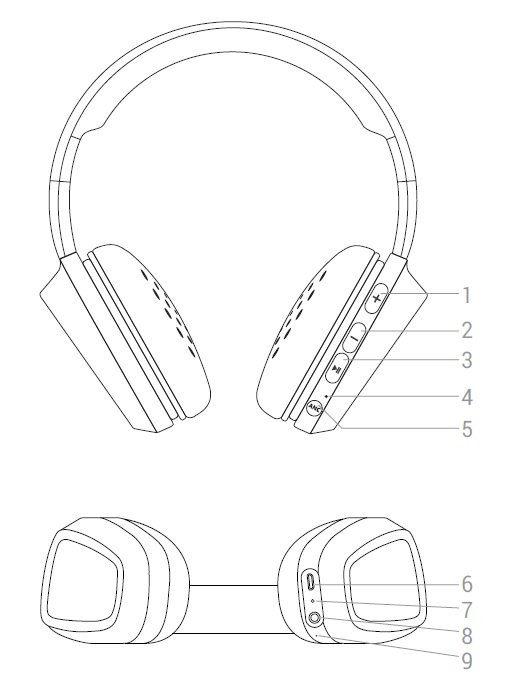
- VOLUME + / NEXT
- VOLUME - / BACK
- MULTIFUNCTION BUTTON
- ANC INDICATOR
- ANC BUTTON
- CHARGING PORT
- STATUS INDICATOR
- AUDIO INPUT
- MICROPHONE
Main functions
Switching on and off the device
To turn on your Headphones 7 Bluetooth ANC press and hold the MULTIFUNCTION button (2) for 2 seconds and the INDICATOR (5) will start flashing blue. You will hear a confirmation sound, which means that the device is on.
To turn off your device, press and hold the MULTIFUNCTION button (2) again for 4 seconds. You will hear a confirmation sound, which means that the device is off. The INDICATOR (5) will stop flashing.
While the device is on, the INDICATOR (5) will keep flashing blue.
Charging the battery
You will hear a warning sound when your headphones are about to run out of battery. This sound will be heard every few minutes until the battery is completely discharged. Connect the microUSB end of theUSB cable provided to the CHARGING PORT (4) of your headphones and the other USB end to any device with an USB charging port that provides energy (PC, USB wall charger, car charger, etc) to charge the battery. The INDICATOR (5) will glow red until the battery is fully charged. The charging time is approximately 4 hours.
Important: We recommend you fully charge the battery before using the product for the first time.
Important considerations:
- We recommend turning off the device while charging it.
- Do not store or leave your device unused for a long period of time with an empty battery.
Bluetooth pairing
When your Headphones 7 Bluetooth ANC are off, press and hold the MULTIFUNCTION button (2) for 4 seconds and the INDICATOR (5) will start flashing blue and red. At this point, your Headphones 7 Bluetooth ANC will be trying to pair with another Bluetooth device. Start then the search and pairing process on your Bluetooth device (smartphone, tablet, laptop, etc). Once your Headphones 7 Bluetooth ANC appear on your device screen, select "connect". The devices will be synchronized immediately without codes. You will hear a confirmation sound and the INDICATOR (5) will flash blue.
Auto power off
Your Headphones 7 Bluetooth ANC will automatically turn off in the following situations:
- After 5 minutes in search mode, if they are not synchronized with another device.
- After 30 minutes, if they are synchronized and music is paused.
Bluetooth playback control
Once your Headphones 7 Bluetooth ANC are syncronized, you will be able to control basic playback functions such as turning up and down the volume and switching to the next or previous song directly from your headphones.
Press the VOLUME + (1) and VOLUME - (3) buttons to turn up and down the volume respectively. You will hear a beep when reaching the maximum volume level.
Press and hold the NEXT button (1) to switch to the next song. You can also press and hold the BACK button (3) to go back to the previous song.
Press the MULTIFUNCTION button (2) once to pause or resume playback.
Note: Your Headphones 7 Bluetooth ANC will automatically turn off if music is paused for more than 30 minutes in order to save battery.
Note 2: If you are using the audio cable instead of the Bluetooth connection, you will have to control music playback from your music player and not from the headphones.
Call control
Once your Headphones 7 Bluetooth ANC and smartphone are synchronized, you will be able to answer calls thanks to the built-in microphone while wearing your headphones.
Use the MULTIFUNCTION button (2) to answer an incoming call. If you are listening to music when you receive a call, playback will pause and you will hear an incoming call sound. You can also press and hold this button for 2 seconds to reject an incoming call.
Press the MULTIFUNCTION button (2) again to end a call. Playback will resume from the point when the music stopped.
Audio input
If you don't want to use the Bluetooth connection, you can also connect your Headphones 7 Bluetooth ANC to your music player using the audio cable provided. You don't need to switch on your headphones if you want to use the audio cable. In order for your headphones to work properly, do not let the battery run down completely.
Simply connect the cable provided to the AUDIO INPUT (8) to enable this mode.
Important: You will not be able to control playback from the headphones while this mode is on so you will have to adjust the volume and switch to the previous/next song from your music player.
ANC (Active Noise Cancelling). System to reduce background noise
Press the ANC button (5) to enable and disable the active noise cancelling mode. The ANC INDICATOR (4) glows when this option is enabled. You don't need to switch on your headphones to enable this mode.
You can enable ANC on your Headphones 7 ANC while either the Bluetooth mode or AUX mode (audio cable) is enabled. If you are studying or sleeping on a plane, you can also enable this function while not listening to music to cancel background noise.
Important: For security reasons, we recommend to disable ANC while walking on the street or carrying out activities in which noise reduction may put users at risk.
Battery life
Your headphones' battery life depends on the mode enabled and the selected volume. See the following table for the ratio between selected volume and battery life:
| Maximum volume | ANC OFF | ANC ON | |
| Bluetooth ON | 14 hours | 13 hours | |
| Line in | - | 24 hours |
| Medium volume | ANC OFF | ANC ON | |
| Bluetooth ON | 19 hours | 16 hours | |
| Line in | - | 70 hours |
| ANC ON | ||
| Playback off | 100 hours |
Warranty
Find the full warranty terms and conditions at:
https://www.energysistem.com/terms-warranty