


Thank you for trusting our company and buying the new Car Transmitter FM Bluetooth. Before you start using the product, we strongly recommend reading this manual to get used to it.
Care and maintenance
Please take into account the following considerations to avoid product damage:
-
Do not use neither corrosive nor abrasive cleaning products.
- Do not disassemble the device. All repair works should be carried out exclusively by qualified staff of Energy Sistem Technology, S.A.
Technical specifications
DISPLAY
- Type: 7-segment LED display
CONNECTIVITY
- Bluetooth 4.2
- USB port and microSD slot to play MP3 and WAV files stored on removable storage units (up to 128 GB).
FM TRANSMITTER
- Frequency range available: 87.5 MHz ~ 108.0 MHz
OTHER FEATURES
- 3.1 A USB charging port for external devices
- 12 V and 24 V DC power adapter for car cigarette lighter
- Electronic overload protection
Product content
- Car Transmitter FM Bluetooth
- Quick guide.
General overview
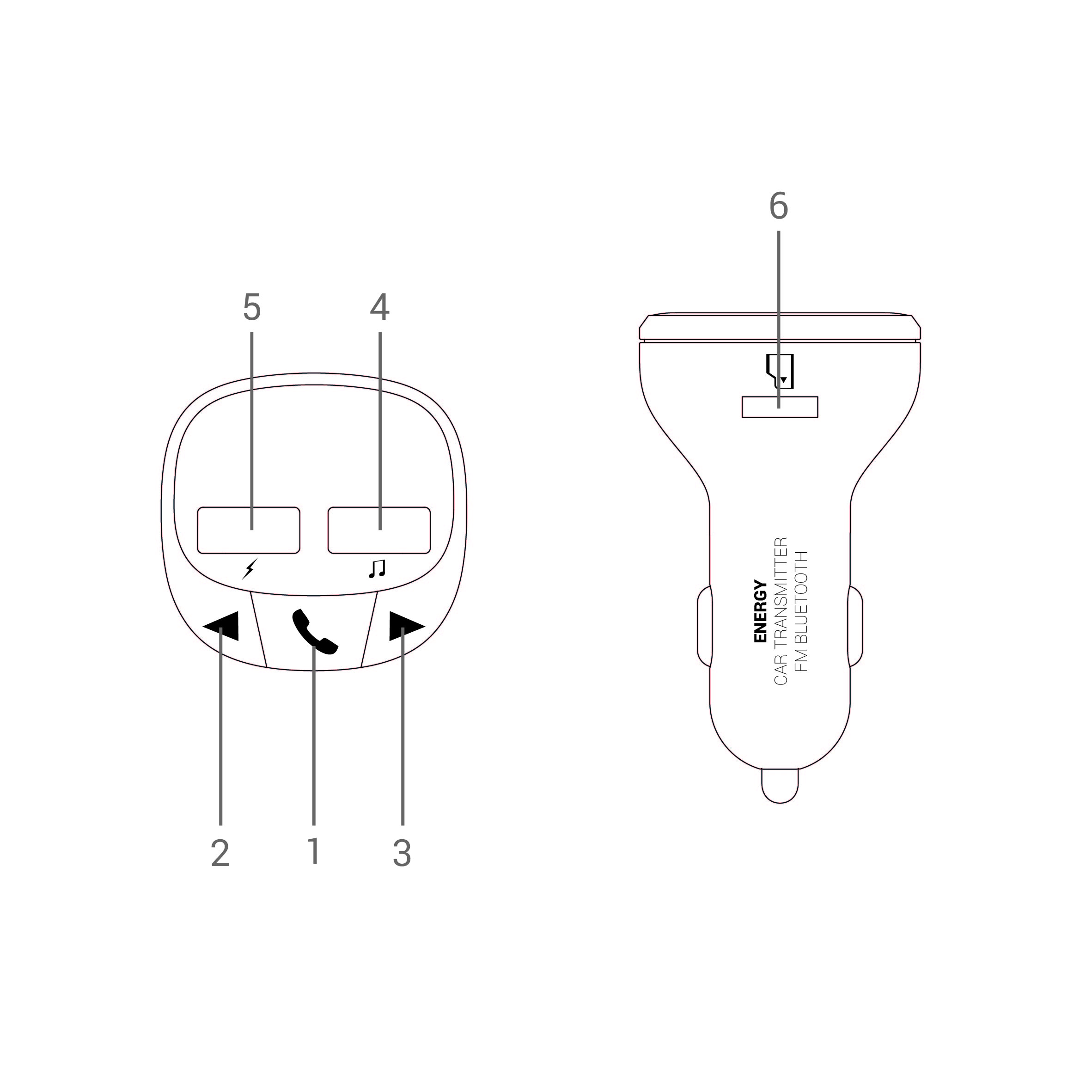
| 1. Play / Pause 2. Volume - / Back 3. Volume + / Next 4. USB player. 5. 3.1 A USB charging port 6. MicroSD card slot |
Switching on and off the device
Car Transmitter FM Bluetooth switches on automatically when you plug it into the car cigarette lighter, provided that the device is supplied with power. To turn it off, simply unplug the device from the cigarette lighter.
FM transmitter
Car Transmitter FM Bluetooth features a built-in FM transmitter to stream music from your source device to the car FM radio receiver. To ensure proper radio signal, tune into the very same radio frequency on both the transmitter and the receiver.
First of all, search for a free frequency on your car radio. You will identify a free frequency easily since the signal is weak or there is no signal at all when selecting it. Once you have selected a free frequency on your car radio, select the very same frequency on your Car Transmitter FM Bluetooth and press PLAY to start playback. At this point your car radio will receive the transmitted signal. If the quality is not good enough, fine-tune the frequency using the car radio or select another free frequency.
To select the frequency on your Car Transmitter FM Bluetooth, press and hold Play / Pause (1) for 2 seconds. At this point the digits start flashing. Press Volume - / Back (2) or Volume + / Next (3) until reaching the desired FM frequency.
MicroSD and USB player
Listen to .mp3 and .wav files from microSD cards or USB sticks (up to 128 GB). The device plays the content automatically a few seconds after inserting the storage unit.
Press Volume + / Next (3) or Volume - / Back (2) to skip to the next or previous track. If you press and hold any of these buttons for a few seconds, you will turn up or down the volume. Press Play / Pause (1) to pause or resume playback.
The folders and files stored on your removable storage units will be read in chronological order. Playback files must be stored in the root folder of the USB stick or microSD card and must not be organised in subfolders.
If both a USB stick and a microSD card are plugged into the Bluetooth Car Transmitter, the device will play the content from the USB drive by default.
Bluetooth
Access the list of available devices on your smartphone or tablet and once there, select "Car Transmitter FM Bluetooth". The devices will be connected without codes. Once the connection has been established, you will hear a confirmation sound.
Car Transmitter FM Bluetooth will automatically switch to Bluetooth mode as long as neither a USB stick nor a microSD card is inserted.
At this point you can start music playback on your smartphone or tablet. The Bluetooth wireless connection range is up to 10 metres.
Press Volume + / Next (3), Volume - / Back (2) and Play / Pause (1) to control music playback from the device.
Hands-free function
Use the built-in hands-free function to talk on the phone while driving. To answer an incoming call, press Play / Pause (1). Press the very same button once again to hang up. Press Play / Pause (1) twice to redial the last telephone number.
Warranty
Find the full warranty terms and conditions at:
https://www.energysistem.com/terms-warranty
Declaration of conformity
Issuer's name: Energy Sistem Technology, S.A.
Address: C/ Calpe, 1 - 03509 Finestrat, Alicante (Spain)
Tel: +34 966 830 324
CIF: A53107488
We declare under our sole and exclusive responsibility that the product:
Description: FM car transmitter
Brand: Energy Sistem
Model: Car Transmitter FM Bluetooth
Manufacturer: Energy Sistem Technology, S.A
Manufacturing country: China
referred to in this declaration complies with the essential norms and standards
EN55032:2015
EN55024:2010
in conformity with the provisions of the Directive 2014/30/EU of the European Parliament and of the Council of 26th February 2014, and with norms and standards
- EN 62638-1:2014+A11:2017
- EN 62479: 2010
- ETSI EN 301 489-1 V2.2.0
- ETSI EN 301 489-9 V2.1.1
- ETSI EN 301 489-17 V3.2.0
- ETSI EN 300 328 V2.1.1
- ETSI EN 301 357 V2.1.1
in conformity with the provisions of the Directive 2014/53/EU of the European Parliament and of the Council of 16th April 2014.
Finestrat, 3rd March 2019

Javier Alvarez Rodriguez
Product Management Director
