


Introduction
- Thank you for trusting our company and buying the new Clock Speaker 3 Light. We hope you enjoy it.
- Speaker with radio alarm function and gradually increasing light to wake up naturally before the alarm or your favourite radio station sounds.
- Play music via Bluetooth. Decorate your bedside table thanks to the multicoloured RGB LEDs with touch control.
- Before you start using your Clock Speaker 3 Light we strongly recommend reading this manual to get used to it.
Care and maintenance
- Do not expose your Clock Speaker 3 Light to impacts, dust, humidity or high temperatures.
- Use neither corrosive nor abrasive cleaning products.
- Do not disassemble the device. All repair works should be carried out exclusively by qualified staff of Energy Sistem Technology, S.A.
- Please make sure your Clock Speaker 3 Light is off when you are not using it. Do not store the device with an empty battery for long periods.
Features
General features
- Speaker with radio alarm function and multicoloured RGB LED lights.
- 8 W sound system for crystal clear, high-quality sound.
- 3 light modes (white, colour and rainbow) with touch control.
- Wake-Up Light: the light intensity increases gradually before the alarm sounds.
- Enjoy your favourite radio stations thanks to the built-in FM radio.
- Dual alarm: set two alarms separately.
- You can wake up to the standard alarm or listening to your favourite radio station.
- Do not fall asleep if there is a power cut thanks to the built-in battery.
- Bluetooth technology to connect your music player and listen to your favourite songs with the convenience of wireless playback.
- Furthermore, you can plug a music player into the 3.5 mm jack audio-in and enjoy your music.
- Snooze function and alarm repetition every 5 minutes (Snooze).
Technical specifications
Audio
- Sound system: mono (1.0)
- Power: 8 W
- 1 full range speaker: 2.75'', 8 W
- Passive radiators: 1 membrane
- Frequency response: 50 Hz ~ 18 kHz
- THD < 1%
- S/N ratio: > 90 dB
Alarm function
- Set 2 alarms separately
- Sunrise simulation using light
- Wake up to an alarm sound or the FM radio
- Gradually increasing alarm volume
- Snooze function
Bluetooth connectivity
- Bluetooth 4.2, class 2
- Frequency band: 2.4 GHz
- Maximum output power: < 20,00 dBm
- Compatible Bluetooh profiles: HSP / HFP / A2DP / AVRCP
- Up to 10 m distance range
- True Wireless Stereo (TWS) technology with a distance range of up to 10 m
- Hands-free function
Lights
- RGB LED lights
- 3 light modes: white, basic colours and Full Colour
- Touch control panel
Analogue inputs
- 3.5 mm jack input (analogue stereo input)
Battery
- Capacity: 1800 mAh / 3.7 V -Type: Li-Ion
- Battery life at medium volume: 11 hours*
- Battery life in clock mode: 45 hours
- Battery life in white light mode: 4 hours
- Charging time: 3 hours
- Power supply: 5.0 V / 2 A
- Charging port: micro USB
Note: *This value is approximate. The battery life depends on the selected volume and the type of music.
Product content
- Clock Speaker 3 Light
- USB Type-A to micro USB cable
- AC/DC power adapter (Europlug)
- Quick guide
General overview

- On/Off
- Playback mode
- Back/Volume -
- Next/Volume +
- Play/Pause
- Touch panel
- Display
- 3.5 mm jack audio-in
- Charging port
- LED indicator
Main Functions
Switching on and off the device
To switch on or off the Clock Speaker 3 Light, slide the On/Off (1) switch up or down. The white LED mode is the mode by default. At this point, the time appears on the Display (7).
Light modes
Your Clock Speaker 3 Light features multicoloured RGB lights. The Touch Control function allows you to control them using the Touch panel (6). This way, you can decorate your bedside table.
Tap the Touch panel (6) to turn on or off the lights.
Press and hold the Touch panel (6) for 3 seconds when the lights are on to choose from 3 light modes: white, colour or rainbow.
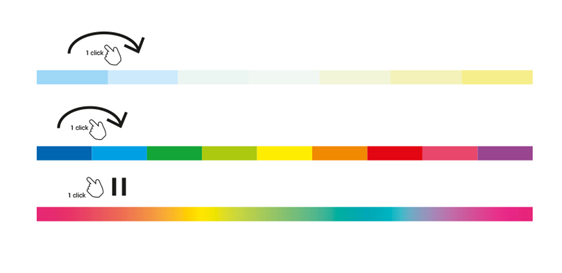
Once the white light mode is enabled, tap the Touch panel (6) to choose the light shade that suits your environment best. You can choose from different shades of blue to yellow.
If colour mode is enabled, tap the Touch panel (6) to choose the colour you prefer for your bedside table.
If you enable rainbow mode, tap the Touch panel (6) once to pause colour transition. Tap again to continue.
Playback modes
Once the Clock Speaker 3 Light is on, you can choose the playback mode you prefer. To do so, press Playback mode (2) until finding the preferred playback mode. You will see the following modes appear on the Display (7):
Clock --> Bluetooth --> FM radio --> AUX
Clock and alarms
Clock
Enable clock mode and press and hold Playback mode (2) for 2 seconds. You will see the hour digits flashing on the Display (7). Press Back/Volume - (3) or Next/Volume + (4) to select the preferred hour. Press Playback mode (2) to confirm. Repeat the steps above to select the minutes.
Alarms
Your Clock Speaker 3 Light allows you to set 2 alarms separately.
Enable clock mode and press Play/Pause (5) repeatedly. You will see the following options appear on the Display (7):
Clock --> Alarm 1 --> Alarm 2
When selecting the first or second alarm, you will see the clock icon with the corresponding number flashing on the Display (7).
Choose the alarm you want to set. Press and hold Play/Pause (5) for 2 seconds. You will see the mode changing from Alarm off to time mode (hh:mm) on the Display (7). At this point, you can set/activate the alarm.
To set and activate an alarm, enter time mode (hh:mm). Press Playback mode (2) for 2 seconds. You will see the hours flashing on the Display (7). Press Back/Volume - (3) or Next/Volume + (4) to select the preferred hour. Press Playback mode (2) to confirm. Repeat the steps above to select the minutes. To select the type of alarm you prefer, "Beep" or "Radio", press Back/Volume - (3) or Next/Volume + (4) and press Playback mode (2) to confirm. Press repeatedly Play/Pause (5) to return to Clock mode.
You will know the alarm is set when the clock icon with its corresponding number is displayed permanently on the Display (7).
The light intensity increases gradually before the alarm sounds. Tap the Touch panel (6) to repeat the alarm every 10 minutes or press and hold to stop it and deactivate the repeat mode.
Note: If you select the radio as alarm sound, you will wake up to the last listened radio station.
Playback control
Select the playback mode, and you will be able to control all playback functions from your Clock Speaker 3 Light.
Press Back/Volume - (3) or Next/Volume + (4) to adjust the volume level according to your preferences.
Press and hold Back/Volume - (3) or Next/Volume + (4) for 2 seconds to skip to the previous or next track.
Press Play/Pause (5) to play or pause a song.
Note: Bear in mind that you can only control playback from the connected music player while using AUX mode (audio-in).
Call control
Press Play/Pause (5) to answer an incoming call or press and hold the very same button to reject it.
Bluetooth (BT)
To pair your speaker with a Bluetooth device, press Playback mode (2) until Bluetooth mode is enabled. You will see both the Bluetooth icon and the LED indicator (10) flashing blue. A sound will confirm the device has entered search mode.
At this point, access the Bluetooth settings on your device and search for the Clock Speaker 3 Light among the detected devices. Select it to establish the connection. You will hear a sound confirming both devices are correctly paired.
Your Clock Speaker 3 Light will automatically pair with your source device when you turn the speaker on again, provided that Bluetooth is enabled on the source device.
Press and hold Playback mode (2) for 2 seconds to disconnect the current device and pair the speaker with a new one.
True Wireless Stereo
This technology allows you to wirelessly connect another True Wireless Stereo device within a maximum distance range of 10 metres to increase power and create a stereo system with separate left and right channels.
Switch on both devices and enable Bluetooth mode. Press and hold Play/Pause (5) on one of the devices for at least 2 seconds. Once the connection is established, you will hear a confirmation sound. From that moment on, both devices will play the same content simultaneously.
To disable the TWS connection, press and hold Play/Pause (5) again for a few seconds until the connection ends.
FM radio
Select FM radio and press Playback mode (2) until a radio frequency appears on the Display (7).
Automatic tuning
To carry out an automatic search of all radio stations, press and hold Playback mode (2) for 2 seconds. At this point, your Clock Speaker 3 Light starts searching for radio stations and shows the saved frequencies on the Display (7).
Once the automatic search is complete, press and hold Back/Volume - (3) or Next/Volume + (4) for 2 seconds to switch between the saved presets. Choose the one you want to hear.
Manual tuning
Press and hold Play/Pause (5) for 2 seconds if you prefer to carry out a manual search. At this point, you will see the Display (7) flashing.
Press Back/Volume - (3) or Next/Volume + (4) to fine-tune the desired radio frequency. Press Play/Pause (5) to confirm. Press Back/Volume - (3) or Next/Volume + (4) to select a radio station. Press Play/Pause (5) to confirm.
Auxiliary audio input (AUX)
You can also plug an external device into the 3.5 mm jack audio-in (8) of your Clock Speaker 3 Light using a 3.5 mm mini-jack audio cable.
NOTE: It is not possible to control music playback from the speaker while using this mode. To control playback functions, you will have to use the connected music player.
Charging the battery
When the battery level is low, you will hear a sound to remind you to charge the battery. Plug the micro USB end of the provided USB cable into the Charging port (9) of your Clock Speaker 3 Light and the other USB end to any device with a 5 V USB charging port to provide energy (PC, USB wall charger, car charger, etc) to charge the battery. The LED indicator (10) lights up red and switches off once the charging process is complete.
Important:
- Use a 5 V 2 A power adapter.
- Do not leave your Clock speaker 3 Light with an empty battery for a long time.
Warranty
You can check the warranty terms here
Declaration of conformity
Issuer's name: Energy Sistem Technology, S.A. - CIF: A53107488
Address: C/ Calpe, 1 - 03509 Finestrat, Alicante (Spain)
Tel: +34 966 830 324
We declare under our own exclusive responsibility that the product:
Description: Bluetooth speaker
Brand: Energy Sistem
Model: Clock Speaker 3 Light
Manufacturer: Energy Sistem Technology, S.A.
Manufacturing country: China
referred to in this declaration is in compliance with the following European Union directives:
Directive 2014/30/EU (EMC) of 29th March 2014
and essential norms and standards:
- EN 62479:2010
- EN 62368-1:2014+A11:2017
- ETSI EN 301 489-1 V2.1.1 (2017-02)
- ETSI EN 301 489-17 V3.1.1 (2017-02)
- EN 55015:2013+A1:2015
- EN 61547:2009
- EN 61000-3-2:2014
- EN 61000-3-3:2013
- EN 55032:2015
- EN 55035:2017
- ETSI EN 300 328 V2.2.2 (2017-03)
- EN 303 345 V1.1.7 (2017-03)
in conformity with the provisions of the Directive 2014/53/EU of the European Parliament and of the Council of 16th April 2014.
Finestrat, 1st November 2019

Javier Álvarez Rodríguez
Innovation and Technology Director
