


Introduction
Thank you for trusting our company and buying the new Music Box BZ7+. We hope you enjoy it.
Before you start using the device, we strongly recommend reading this manual to get used to it.
Care and maintenance
- Do not expose your Music Box BZ7+ to impacts, dust, humidity or high temperatures.
- Use neither corrosive nor abrasive cleaning products.
- Do not disassemble the device. All repair works should be carried out exclusively by qualified staff of Energy Sistem Technology, S.A.
Technical specifications
Audio
- System: 2.1
- Power: 20 W
- 2 full range speakers: 1.5?, 5 W + 1 woofer: 2.75?, 10 W
- Frequency response: 50 Hz - 18 kHz
- Signal/Noise ratio: > 80 dB
Wireless connectivity
- Bluetooth v5.0, class II. Up to 20 m distance range
- Compatible Bluetooth profiles: HSP / HFP / A2DP / AVRCP
- Frequency band: 2.4 GHz (2.402 ~ 2.480 GHz).
- Maximum output power: < 20 dBm
- Hands-free function. Microphone sensitivity: -42 dB
- True Wireless Stereo (TWS) technology
TWS technology compatible with
- Music Box BZ7+
Audio input
- 3.5 mm mini jack stereo audio-in (AUX)
Audio output
- 3.5 mm mini jack stereo audio output for headphones
FM radio
- Frequency band: 87.5 ~ 108 MHz
- Automatic and manual tuning
USB and SD playback
- SD and USB decoder: reads MP3 and WAV files stored on external units (up to 128 GB) with FAT/ FAT32 file system.
Battery
- Capacity: 4000 mAh / 3.7 V
- Type: lithium polymer
- Battery life: up to 12 hours*
- Charging port: USB Type-C
-
Charging time: 3 hours
- The battery life depends on the selected volume level and the type of music.
Product content
- Music Box BZ7+
- USB Type-C cable to charge the battery.
- Quick guide.
General overview
| 1. On/Off 2. Playback mode 3. Play/Pause 4. Volume + 5. Volume - 6. Next 7. Back 8. Display 9. USB Type-C charging port 10. USB playback port 11. SD card slot 12. 3.5 mm audio-in (AUX) 13. 3.5 mm audio output for headphones |
 |
Main Functions
Switching on and off the device
To switch on your Music Box BZ7+, press and hold On/Off (1) on the top panel for 3 seconds. At this point, the Display (8) lights up showing the selected playback mode.
Press and hold On/Off (1) on the top panel for 3 seconds to switch off the device. The Display (8) will switch off.
Note 1: When switching on the device, it will always enable the last selected playback mode.
Playback modes
Once the Music Box BZ7+ is on, you can choose the playback mode you prefer. To do so, press Playback mode (2) repeatedly until finding the preferred playback mode. Playback modes will appear in the following order:
Bluetooth --> SD --> USB --> Radio --> AUX
If you plug a removable storage unit (USB stick or SD card) or use the AUX input, your Music Box BZ7+ will enable the corresponding playback mode and will play the content automatically.
Playback control
Select a playback mode and you will be able to control all playback functions from your Music Box BZ7+.
Press Play/Pause (3) to play or pause a song.
Press Volume - (5) or Volume + (4) to adjust the volume level according to your preferences.
Press Back (7) or Next (6) to skip to the previous or next song.
Important: If you are using the AUX input, you will have to control playback from the connected music player.
Bluetooth (BT)
To pair your speaker with a Bluetooth device, press Playback mode (2) until Bluetooth mode is enabled. The Bluetooth symbol (bt) will flash on the Display (8).
At this point, access the Bluetooth settings on the device and search for Energy Sistem Music Box BZ7+ among the detected devices. Select it to establish the connection. The devices will be connected immediately. You will hear a sound confirming both devices are correctly paired. At this point, the Bluetooth symbol (bt) is displayed permanently on the Display (8).
Your Music Box BZ7+ connects to the last paired device automatically when you switch it on once again, provided that the Bluetooth connection on the source device is enabled.
Press and hold Playback mode (2) for 2 seconds to disconnect the current device and pair the Music Box BZ7+ with a new one. You will hear a sound when both devices disconnect and the Bluetooth symbol (bt) will flash on the Display (8).
True Wireless Stereo (TWS)
This technology allows you to wirelessly connect a second Music Box BZ7+ within a maximum distance range of 20 metres to increase power and create a stereo system with separate left and right channels.
To do so, pair one speaker with your smartphone via Bluetooth first. Once you've done this, switch on the second speaker and enable Bluetooth mode.
Press and hold Play/Pause (3) for 2 seconds on the speaker connected to the smartphone. At this point, the Bluetooth symbol (bt) flashes quickly on the Display (8). A few seconds later you will hear a sound to confirm both speakers have been successfully synchronised.
You will hear the music through both speakers at the same time. A speaker will be assigned the left channel (L) and the other one the right channel (R).
The next time you turn on both speakers, they will pair with one another automatically.
To disable the True Wireless Stereo function, press and hold Play/Pause (3) for two seconds on any of your Music Box BZ7+. You will hear a confirmation sound when both units disconnect.
Skip to the next/previous track and adjust the volume from any speaker while TWS mode is enabled. If you turn up the volume on any of the speakers, you will be turning up the volume of both of them at the same time.
Important: This is only possible if Bluetooth mode is enabled. In all other playback modes (USB, SD or AUX-in) a TWS connection is not possible.
Removable USB sticks/SD cards
Play .mp3 and .wav files from your USB sticks or SD cards (up to 128 GB). Plug the USB stick into the USB playback port (10) or the SD card into the SD card slot (11). The speaker plays the contents automatically a few seconds after inserting the storage unit.
If you turn off your Music Box BZ7+ or select another playback mode, the internal memory will save the moment where you paused playback.This way, music playback will always resume from the last track you listened to.
Press Play/Pause (3) to play or pause a song.
Press Volume - (5) or Volume + (4) to adjust the volume level according to your preferences.
Press Back (7) or Next (6) to skip to the previous or next song.
To select the next folder, press and hold Playback mode (2).
To select the preferred playback mode, press and hold Play/Pause (3) for 2 seconds. The information below will appear on the Display (8):
1) ALL: all USB or card contents will be repeated. The folders and files stored on your removable storage units will be read in chronological order.
2) ONE: the song you are listening to will be repeated.
3) RAN: Random. Random playback of all the contents of your removable storage unit.
4) FOLD: Folder. The folder with the songs you are listening to will be repeated.
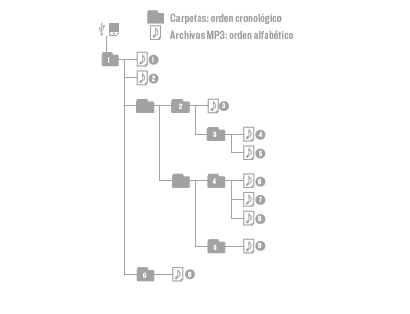
The root folders and files of your removable USB stick or SD card will be read in chronological order and the songs included in your folders in alphabetical order.
Here you have a diagram of the reading order:
FM radio
To enable FM radio mode, press repeatedly Playback mode (2) until it appears on screen.
Automatic tuning
To carry out an automatic search of all radio stations, press and hold Playback mode (2) for 2 seconds. At this point, your Music Box BZ7+ starts searching for radio stations and shows the saved frequencies on the Display (8).
Once the automatic search is complete, press and hold Back (7) or Next (6) to switch between the saved frequencies. Choose the one you want to hear.
Manual tuning
Press and hold Play/Pause (3) for 2 seconds if you prefer to carry out a manual search and fine-tune any frequency. When the selected frequency starts flashing on the Display (8), you can press Back (7) (tune -) or Next (6) (tune +) to fine-tune it.
Press and hold Play/Pause (3) for 2 seconds to confirm. The radio station will be saved and will stop flashing on the Display (8).
Presetting the radio stations
To preset your radio stations, first select the frequency you want to move. Press and hold Next (6) for 2 seconds. At this point, the Display (8) starts flashing and the preset numbers appear. Press Back (7) or Next (6) until you find the preset number you prefer. Once you have selected the new preset number you want to assign to the previously selected radio station, press and hold Next (6) for 2 seconds. The selected radio station will be saved under the new preset number immediately.
Erasing radio stations
If you want to erase a radio station, first select its corresponding frequency. Press and hold Back (7) for 2 seconds. At this point, the Display (8) starts flashing. Press the very same button for 2 seconds to erase the radio station.
Important: We recommend carrying out a new automatic search if you place the Music Box BZ7+ somewhere else.
Auxiliary audio input
Your Music Box BZ7+ features a 3.5 mm audio-in (AUX) (12) to plug your music player using a 3.5 mm jack cable.
When using the audio-in (AUX), your Music Box BZ7+ enters AUX mode automatically, thus showing it is ready to start playing content from an external device.
Important: If this mode is enabled, you will have to control playback from the connected music player.
Equaliser
The speaker features a digital equaliser with several preset modes. Press quickly 2 times the Mode (2) button, to select the preferred EQ mode while the device is playing music. There are 5 EQ modes available:
EQ1: Flat or flat EQ.
EQ2: Bass, EQ for an extra bass boost.
EQ3: Treble, EQ for an extra treble boost.
EQ4: Mid high, EQ for a mid boost.
EQ5: Mid low, EQ for a mid cut.
Charging the battery
When the battery level is at 90% or higher, the full battery symbol appears on the Display (8). When it drops below 90%, the symbol disappears.
An empty battery symbol appears on the Display (8) when the battery level drops to 10%. The symbol flashes when it drops below 5% of its capacity. You will also hear a warning sound if it drops below 2%.
To charge the battery, plug the USB Type-C end of the provided USB cable into the USB Type-C charging port (9) and the other USB end to any device with a 5 V USB port (PC, USB wall charger, car charger, etc.). The LED next to the USB Type-C charging port (9) glows during the charging process.
The speaker has an approximate battery life of 12 hours at 75% of volume. The battery life depends on the selected volume and the type of music.
The charging time is approximately 2 and a half hours.
Important:
- Use a 5 V 2 A AC/DC power adapter.
- Do not leave your Music Box BZ7+ completely discharged for a long time.
Note: The speaker will automatically reduce the volume when the battery level is low in order to protect the battery and optimize battery life.
Resetting the device
You can reset your Music Box BZ7+ by pressing the reset button inside the 3.5 mm audio output for headphones (13) with a toothpick.
Note: Avoid using metallic objects when performing the reset.
Warranty
You can check the warranty terms here:
https://www.energysistem.com/terms-warranty
Declaration of conformity
Issuer's name: Energy Sistem Technology, S.A. - CIF: A53107488
Address: C/ Calpe, 1 - 03509 Finestrat, Alicante (Spain)
Tel: +34 966 830 324
We declare under our sole and exclusive responsibility that the product:
Description: portable wireless speaker
Brand: Energy Sistem
Model: Music Box BZ7+
Manufacturer: Energy Sistem Technology, S.A.
Manufacturing country: China
referred to in this declaration is in compliance with the following European Union directives:
EN 50663:2017; EN 62479:2010
EN 62368-1:2020+A11:2020
EN 301 489-17 V3.2.2 (2019-12)
EN 301 489-1 V2.2.3 (2019-11)
EN 300 328 V2.2.2 (2019-07)
EN 303 345-1 V1.1.1 (2019-06)
EN 303 345-3 V1.1.0 (2019-11)
in conformity with the provisions of the Directive 2014/53/EU of the European Parliament and of the Council of 16th April 2014.
Finestrat, 1st June 2021
UKCA Declaration of conformity
Issuer's name: Energy Sistem Technology, S.A. - CIF: A53107488
Address: C/ Calpe, 1 - 03509 Finestrat, Alicante (Spain)
Tel: +34 966 830 324
We declare under our sole and exclusive responsibility that the product:
Description: portable wireless speaker
Brand: Energy Sistem
Model: Music Box BZ7+
Manufacturer: Energy Sistem Technology, S.A.
Manufacturing country: China
referred to in this declaration is in compliance with the essential norms and standards
EN 300 328 V2.2.2 (2019-07)
EN 301 489-17 V3.2.4 (2020-09)
EN 301 489-1 V2.2.3 (2019-11)
EN 50663:2017; EN 62479:2010
EN 62368-1:2014+A11:2017
in conformity with the provisions of the Directive UK: Radio equipment Regulations 2017.
Finestrat, 1st June 2021

Miguel Ángel Aragüez García
Innovation and Technology Director

Miguel Ángel Aragüez García
Innovation and Technology Director
