


Introduction
- Thank you for trusting our company and buying the new Earphones Sport 4 True Wireless. We hope you enjoy the product.
Care and maintenance
- Do not expose your Earphones Sport 4 True Wireless to impacts, dust, humidity or high temperatures.
- Do not use neither corrosive nor abrasive cleaning products.
- Do not disassemble the device. All repair works should be carried out exclusively by qualified staff of Energy Sistem Technology, S.A.
-
Please make sure your Earphones Sport 4 True Wireless are off when you are not using them. Do not let them completely discharged for a long time.
- You can clean the earbuds? external surface and charging connectors with a clean cloth and hand sanitiser. Do not use these products to clean the ear tips or the internal mesh of the earphones. Avoid getting the charging ports and connectors wet.
Note: After every workout session, we recommend thoroughly drying the earphones before putting them back in the case.
Warning
Hearing loss
Listening to loud music can cause irreversible hearing loss. To avoid hearing damage, we recommend the following guidelines:
- Do not listen to loud music for long periods of time.
- Turn the volume down on the source device before using the headphones, then gradually increase the volume to a safe volume level.
Safety
For safety reasons and to avoid possible accidents, we recommend the following safety measures:
-
Do not use the headphones while driving or carrying out any other activity that requires special attention.
- Keep the product, packaging and accessories out of the reach of children and pets to avoid accidents and choking hazard.
Features
General features
- Secure-Fit system that provides perfect fit during you workouts.
- Sweat- and splashproof according to IP65 standard. There?s nothing to worry about.
- Deep and powerful bass that will make you vibrate with each song.
- Enjoy your music and calls and forget about running out of battery with the 30-hour battery life (5 hours every time you charge them and 25 additional hours with the charging case).
- Built-in microphone and calls in stereo to speak comfortably, without worrying about the noise.
- USB Type-C connector.
Technical specifications
Audio
- Frequency response: 20 Hz ~ 20 kHz
- Driver diameter: 14 mm
- Neodymium magnet
- In-ear design
- Type: dynamic
Connectivity
- Bluetooth® 5.1 (class 2) wireless technology.
- Frequency band: 2.4 GHz
- Maximum output power: < 20.00 dBm
- Compatible Bluetooth profiles: HFP / A2DP / AVRCP
- Up to 20 m distance range
- True Wireless function with auto-pairing
- Hands-free function
- Voice assistant compatible with Google/Siri
Microphone
- Type: built-in microphone
- Sensitivity: -42 dB ± 3 dB (@1 kHz)
- Frequency response: 100 Hz ~ 10 kHz
Battery
Earbuds:
- Capacity: 40 mAh / 3.7 V
- Type: lithium-polymer battery
- Battery life at medium volume: 5 hours*
- Charging time: 1.5 hours
- Changing method: charging case
"*" This value is approximate. The battery life depends on the selected volume and the type of music.
Charging case:
- Capacity: 500 mAh / 3.7 V
- Type: lithium-polymer battery
- Extra battery life: 25 hours*
- Charging time: 2 hours
- Charging method: USB Type-C
Other features
- Touch panel to control music playback
- IP65 certified
Product content
- Earphones Sport 4 True Wireless
- Charging case
- Interchangeable ear tips
- USB Type-C cable
- Quick guide
Important: We recommend trying out the provided ear tips in different sizes to choose the ones that fit your ears best. Using ear tips that don?t fit correctly may have an impact on the perceived sound quality.
General overview
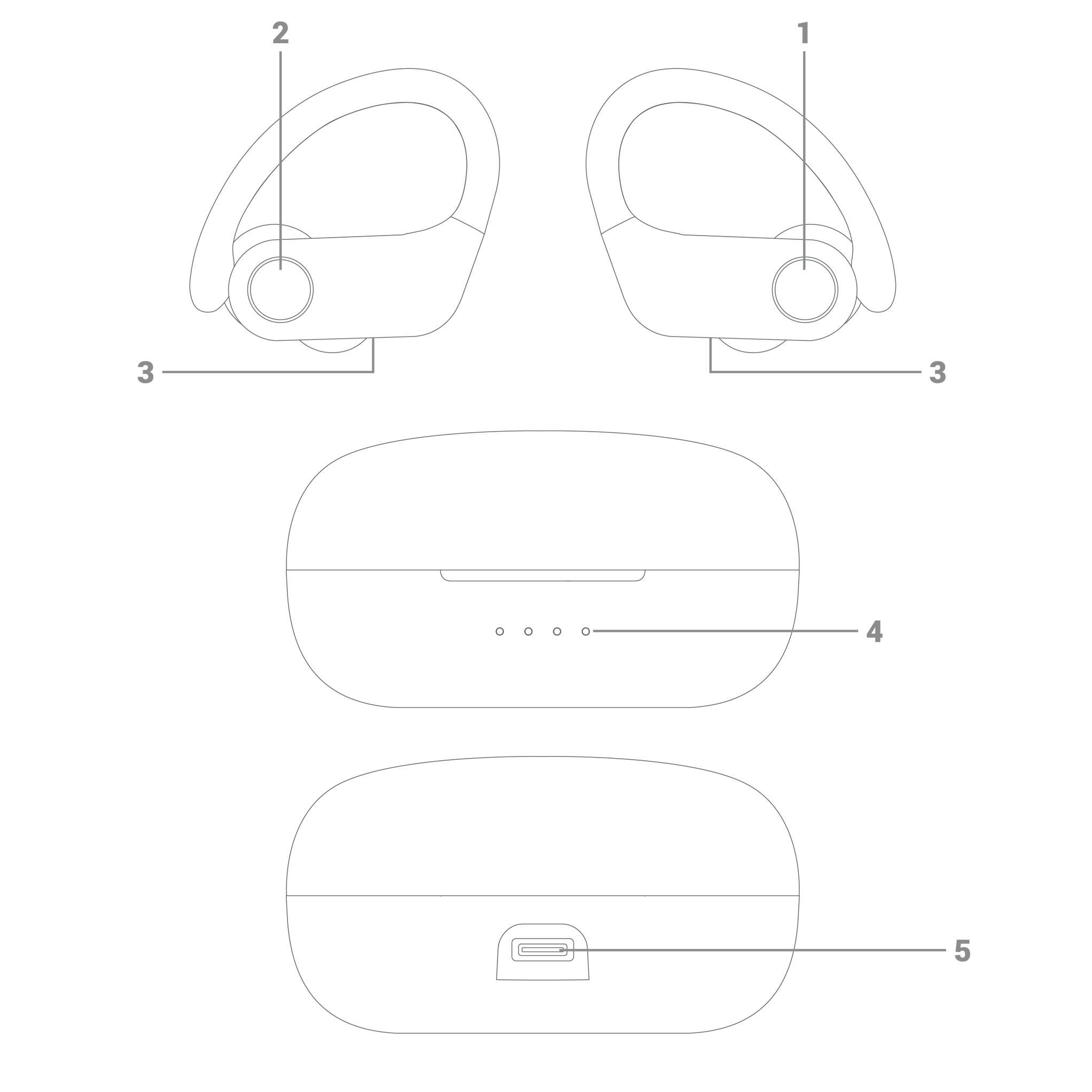
- Left multifunction button
- Right multifunction button
- LED status indicator
- Charging indicator (charging case)
- USB Type-C charging port
Main Functions
Switching on and off the device
To switch on your Earphones Sport 4 True Wireless, simply take them out of the charging case or press and hold the Left and Right multifunction buttons (1 and 2) for 10 seconds. At this point, the LED status indicator (3) on both earbuds starts flashing. Once the earbuds are synchronised, only one of the LED status indicators (3) will continue blinking.
To switch off your Earphones Sport 4 True Wireless, put them back in the charging case or press and hold the Left or Right multifunction buttons (1 or 2) for 10 seconds.
Bluetooth® pairing
Switch on your Earphones Sport 4 True Wireless. The LED status indicator (3) on both earbuds starts flashing and the earbuds pair automatically. Only one of the LED status indicators (3) will continue blinking. This means the earbuds have entered pairing mode. Select Earphones Sport 4 True Wireless from the list of Bluetooth devices on your smartphone or Bluetooth music player and press ?connect?. Both devices will be connected immediately and without codes. You will also hear a confirmation sound. At this point, the LED status indicator (3) flashes slowly in blue.
If you previously paired the earbuds with a device, it is not necessary to repeat the process. Just enable the Bluetooth connection on your music player and switch on your Earphones Sport 4 True Wireless. They will sync with it automatically.
Playback control
Play / Pause
Press the Left or Right multifunction button (1 or 2) twice in a row to resume playback or pause the music.
Volume + / Volume -
Press the Left or Right multifunction button (1 or 2) to turn the volume up or down.
Skipping to the next / previous track
Press and hold the Left or Right multifunction button (1 or 2) for 2 seconds to skip to the next or previous track during music playback.
Call control
Once the Earphones Sport 4 True Wireless and your smartphone are paired, you can control calls from the earphones.
Answering / Ending a call
To answer an incoming call, press the Left or Right multifunction button (1 or 2) twice in a row. Press the same button twice to hang up.
Using the Voice Assistant feature
You can interact with your smartphone voice assistant using your Earphones Sport 4 True Wireless. To do so, press the Left multifunction button (1) three times in a row. You can give the voice command after 2-3 seconds when hearing the confirmation sound.
Charging the battery
Earphones
When the battery level of your Earphones Sport 4 True Wireless is below 10%, you will hear a low battery warning sound. To charge the earphones battery, put the earbuds back in the charging case. The earphones LED status indicator (3) lights up and switches off once the charging process is complete.
Caution: Avoid getting the openings and the charging connectors wet.
Note: After any exercise, it is recommended to dry the headphones thoroughly before charging.
Charging case
When the battery level of the charging case is below 10%, the first LED of the Charging indicator (charging case) (4) starts flashing. Plug the USB Type-C end of the provided cable into the USB Type-C charging port (5), and the other end into a 5 V USB charging device. The LEDs of the Charging indicator (charging case) (4) light up as the battery charges. Once the charging process is complete, all LEDs will glow.
Important: We recommend not leaving neither your Earphones Sport 4 True Wireless nor your charging case unused for long periods of time with an empty battery. We advise charging the battery at least once a month.
Caution: Do not charge your headphones with fast charging adapters or dedicated laptop charging adapters, Because their output voltage exceeds 5V and the device may become unusable.
Restoring default settings
To restore the device to its default settings, follow the steps below:
1- Switch on your earphones and press the Left or Right multifunction button (1 or 2) ten times in a row. You will hear a sound and both earbuds will switch off.
2- Switch them on again and repeat the steps to pair them with your smartphone or Bluetooth music player.
Warranty
Find the full warranty terms and conditions at: www.energysistem.com/terms-warranty.
Trademarks
All company brand and product names are trademarks or registered trademarks of their respective companies. Specifications are subject to change without notice.
© 2022 by Energy Sistem Technology, S.A. All rights reserved.
Declaration of conformity
Issuer's name: Energy Sistem Technology, S.A. - CIF: A53107488
Address: C/ Calpe, 1 - 03509 Finestrat, Alicante (Spain)
We declare under our sole and exclusive responsibility that the product:
Description: wireless earphones
Brand: Energy Sistem
Model: Earphones Sport 4 True Wireless
Manufacturer: Energy Sistem Technology, S.A.
Manufacturing country: China
referred to in this declaration complies with the essential norms and standards
EN 50663:2017
EN 62368-1:2019
ETSI EN 301 489-1 V2.2.3(2019-11)
ETSI EN 301 489-17 V3.2.0(2017-03)
ETSI EN 300 328 V2.2.2(2019-07)
in conformity with the provisions of the Directive 2014/53/EU of the European Parliament and of the Council of 16th April 2014.
Finestrat, 1st June 2022

Miguel Ángel Aragüez García
Innovation and Technology Director
